
Building a Personal Executive Assistant - Part 1
An overview of my personal executive-assistant setup, why I am building it, and the problems I want it to solve.
I have been working on a personal executive assistant, which brings together information from my email, calendars, tasks, and notes. I wanted a setup that could use this information to help prepare for things and follow up on outstanding work, without needing me to explain the same context every time.
In this post, we are going to look at why I am building this, the applications and services involved, and some of the problems with getting them to work together. There are already working parts of the setup, however there is still work to do before I can rely on the whole thing day to day.
Why build an assistant?
If you use a task manager and a notes application, you probably already have somewhere to put most of this information. I use OmniFocus for tasks, and Obsidian for notes. These are useful applications, and I want to keep using them.
The problem is keeping the information in them up to date with everything happening elsewhere. An email might change a deadline, or a conversation might contain a decision which makes an existing task unnecessary. I still need to notice that, find the task, and update it. Having the information available in another application only helps if I remember to look there.
For example, if I am preparing for a meeting, I might need the calendar entry, an email thread, an attached document, and some previous notes. If the meeting moves or the document changes, the preparation needs to change as well. Ideally, the assistant would bring the relevant information together and work out what still needs doing, then prepare what it can or ask me for the decision it needs.
This also needs to be selective. Sending me a notification for every email would just give me more things to review. I want help with the work involved in keeping track of things, including doing useful preparation before I ask for it.
Existing options
There are a few different ways to approach this, and I am using parts of them in this setup.
Task managers and notes
A task manager works well once something has been turned into a task. Notes are useful for recording decisions and keeping the supporting information. The part I want help with is getting from a conversation to an appropriate task, and keeping that task connected to later changes.
I could do this with more manual reviews and links between notes, but that still leaves me maintaining all of those connections. The assistant needs to be able to read the relevant material and prepare the updates, while preserving anything I have written myself.
Automation
Automation is useful when you know what should happen for a particular input. However, an incoming message might be a new request, a correction to an earlier one, or something that has already been dealt with. Those need different handling.
There is also the issue of what happens when an operation fails halfway through. If a task is created but the response never arrives, retrying the request could create another task. Before trying again, the system needs to check whether the original action succeeded. If it cannot determine that, it needs to retain that uncertainty.
AI assistants
An AI assistant can help interpret the information, but it needs access to the right information in the first place. An email preview might omit the important part of a message, and the answer might be in an attachment or an older conversation which was never retrieved.
Additionally, information changes. A search result can be relevant to a question while containing an outdated answer. For my setup, I need to know where the information came from, which version was used, and whether anything important is missing.
These are the gaps I am trying to address across my applications. The existing tools provide much of what I need; building the integration gives me control over how the context and follow-up work move between them.
The setup
The main components are:
- Personal Context Platform (PCP), which captures and retains information from authorized sources
- Cloudflare D1 and R2, which store the captured records and content
- AI Search, which helps retrieve relevant information
- dot and the executive-assistant service, which handle interpretation and follow-through
- OmniFocus and Obsidian, where I continue to use my tasks and notes
There is also work involving Graphiti for relationships and changes over time, which I will cover separately.
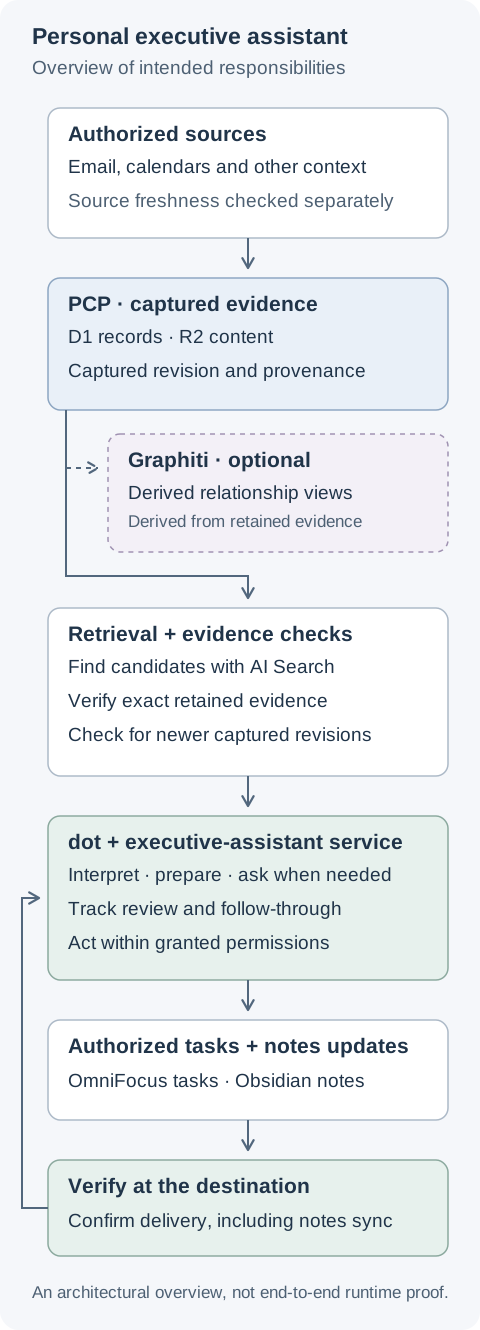
The intended responsibilities of each part of the setup. This is an architectural overview; it does not mean that every path is working reliably end to end.
In this post:
- Capture and retrieval
- Interpretation and follow-through
- Tasks, notes and delivery checks
- Permissions and corrections
Personal Context Platform
PCP handles the source information. It retains the captured content along with enough information to identify where it came from and which revision it represents, using D1 and R2 for storage.
This is important when something changes. The assistant needs to be able to refer back to the information it used, while checking whether a newer version is available from the source. Keeping a copy does not automatically tell us that it is still current.
AI Search is used to help find relevant material. The retained source records remain available independently of the search index, so rebuilding the index should not mean losing the originals.
Graphiti has also been part of this work, for derived views of relationships and how they change over time. It remains optional, and its wider role is still being evaluated. The basic retrieval and follow-up paths need to work independently of it.
Executive assistant
The conversational assistant, dot, handles interpreting my requests and deciding what is useful to do with the available information. The executive-assistant service stores its internal follow-through state in D1, including what has been reviewed and what is still waiting for something to happen.
One thing to note is that receiving an event, reviewing it, and completing an action are separate steps. If the system has accepted a request, we still need to know whether the assistant reviewed it and whether any resulting action actually happened. Keeping this state allows work to continue after a restart without treating everything as a new request.
Tasks and notes
OmniFocus continues to hold the tasks I need to do. Obsidian, together with my Knowledge Platform, holds the notes I read and edit. The assistant’s internal work stays separate, so its processing steps do not all end up in my task list.
When an authorized action changes something in an application, the result needs to be checked there. For notes, this includes checking that the update has reached the place where I read it. A note can be generated and published successfully while synchronization is still pending.
Some important details
Permissions need to be specific enough that routine preparation can happen without repeatedly asking me to approve the same read. Sending a message or changing an application needs its own authorization. A request found inside an email cannot grant that permission.
Corrections also need to carry through the system. If I change a plan, the next conversation should use the correction, and an older worker should not continue acting on the previous version. When multiple agents are involved, there needs to be one responsible writer for an action to avoid duplicate or conflicting updates.
These are some of the areas still being worked on. Parts of capture, retrieval, review, and delivery exist and have been exercised individually. End-to-end reliability is still being repaired and tested, with some work remaining in planning. Missing history and attachments, correction handling, and verification of the final result are all part of that work.
Next steps
In the next part, we will look more closely at PCP and how the source information is captured and retrieved. Later posts will cover follow-through, permissions, and getting useful updates into tasks and notes.
Coming next:
- PCP: capture and retrieval
- Executive-assistant follow-through and permissions
- Tasks, notes and delivery checks
For now, this is an overview of what I am building. There is still quite a bit to get working reliably, but the intended result is fairly straightforward: being able to ask for help without first having to gather and explain all of the context myself.
Comments